


Download Android Video Turbo Converter – Fast, Free Video Converter for Android Devices
Introduction – Why Android Video Turbo Converter Is the Go‑to Tool for Mobile Video Playback
If you’ve ever tried to watch a movie or a home video on your Android phone only to be greeted by a “format not supported” error, you know how frustrating it can be. Android Video Turbo Converter solves that problem with a lightweight, free, and secure desktop application that lets you convert virtually any video file into a format that Android devices love. Built for Windows users who need a quick, reliable way to re‑encode AVI, MOV, WMV, FLV, and many other popular containers, this converter works entirely offline, so you don’t have to worry about privacy‑invasive cloud services.
The software offers pre‑set profiles for a wide range of Android smartphones and tablets, meaning you can skip the technical jargon and let the app handle bitrate, resolution, and codec choices for you. Even if you’re a power user, the interface provides manual sliders for fine‑tuning output parameters, giving you the flexibility to balance quality and file size. With a simple drag‑and‑drop workflow, an intuitive progress bar, and lightning‑fast conversion speeds, Android Video Turbo Converter stands out as a dependable, no‑nonsense utility for anyone who wants to enjoy their media on the go.
Key Features, Pros, and Cons – What Sets This Converter Apart
- Supports major video formats: AVI, MOV, WMV, FLV, MP4, MKV, and more.
- Device‑specific presets for over 50 Android phones and tablets.
- Fast, multi‑threaded conversion engine that utilizes all CPU cores.
- Simple drag‑and‑drop interface with real‑time preview of conversion settings.
- Customizable output options: resolution, bitrate, frame rate, and audio codec.
- Batch conversion capability for processing multiple files at once.
- Lightweight installer (< 5 MB) and no additional runtime dependencies.
- Free to download, with optional paid upgrade for advanced editing tools.
- Secure, offline processing—your video files never leave your PC.
- Automatic updates that keep the conversion engine compatible with the latest Android versions.
Pros
- Very easy to use – ideal for beginners and occasional converters.
- Fast conversion times thanks to optimized hardware utilization.
- Pre‑set profiles eliminate the need for manual configuration.
- Free version offers all core features without hidden fees.
- Secure, offline operation protects personal video content.
Cons
- Only available for Windows; no native macOS or Linux build.
- Lacks advanced editing tools (e.g., trimming, subtitles) in the free version.
- Interface is functional but not as polished as premium competitors.
- Batch processing can become sluggish on older hardware.
- No direct mobile app – conversion must be done on a PC.
Installation, Usage, and Compatibility – Getting Started in Minutes
Downloading Android Video Turbo Converter is straightforward. Visit the official website, click the “Download for Windows” button, and save the .exe installer to your PC. The installer is less than 5 MB, and the setup wizard guides you through a quick, three‑step process: accept the license agreement, choose an installation folder (the default works for most users), and click “Install.” Once installed, launch the application from the desktop shortcut or the Start menu. The first run may prompt you to allow the program to make changes to your system – this is normal for software that needs to access media files and hardware acceleration.
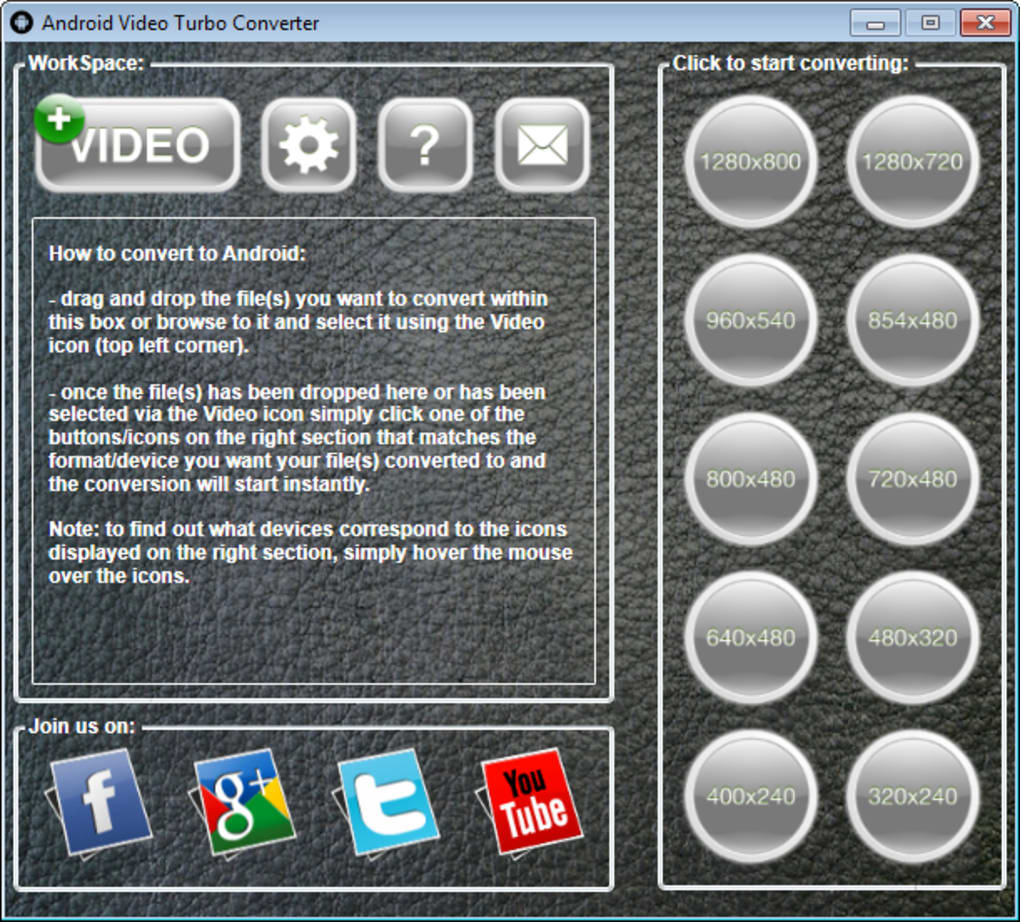
Using the converter is designed to be as painless as possible. You can either click the “Add Files” button and browse to the videos you want to convert, or simply drag the files onto the main window. After your files appear in the queue, select an Android device preset from the drop‑down menu – for example, “Galaxy S23 (1080p)” or “Pixel 7 (720p).” The software automatically adjusts the output container to MP4, the codec to H.264, and sets an appropriate bitrate to ensure smooth playback on the chosen device. If you need more control, click “Advanced Settings” to modify resolution, frame rate, or audio parameters. Choose a destination folder, then press “Convert.” A progress bar displays real‑time status, and you’ll receive a desktop notification when the conversion completes.
Regarding compatibility, Android Video Turbo Converter is built specifically for the Windows operating system (Windows 10, 11, and 7 SP1 or later). The software leverages DirectX and Media Foundation APIs, which means it runs best on machines with at least a dual‑core processor, 2 GB RAM, and 500 MB of free disk space. While the tool does not have a native macOS version, many users run it on macOS via Boot Camp or a virtual Windows environment. The conversion output is universally compatible with Android 5.0 and newer, covering virtually all smartphones, tablets, and even Android TV devices. The resulting MP4 files can be transferred via USB, Bluetooth, or cloud services, ensuring a seamless playback experience across the Android ecosystem.
FAQ & Final Verdict – Your Questions Answered and How to Get Started
Is Android Video Turbo Converter really free?
Yes, the core conversion engine is completely free. You can convert unlimited videos without paying. An optional paid upgrade unlocks advanced editing features, but it’s not required for basic Android video conversion.
Can I convert videos on a Mac?
The official build runs only on Windows. Mac users can run the software through a Windows virtual machine, Boot Camp, or use an alternative Mac‑compatible converter if they prefer native support.
What video formats are supported?
It supports AVI, MOV, WMV, FLV, MP4, MKV, MPEG‑2, and many other common containers. The output is always MP4 (H.264) to guarantee playback on Android devices.
How secure is my video data during conversion?
All conversions happen locally on your computer. No files are uploaded to the cloud, so your media remains private and secure.
Will the converted video play on older Android phones?
Yes. The preset profiles include options for low‑end devices, using lower resolutions and bitrates that work smoothly on Android 5.0 and later.
**Final Verdict** – Android Video Turbo Converter is a solid, no‑frills utility that delivers exactly what it promises: fast, free, and secure video conversion for Windows users who need Android‑compatible files. Its preset system removes the guesswork, while the manual controls satisfy power users. Although it lacks a macOS version and advanced editing tools, the core functionality is more than enough for everyday video playback needs. If you’re looking for a trustworthy tool that won’t force you into a subscription, this app is a great choice.
Android Video Turbo Converter earns a solid four‑star rating for its speed, ease of use, and reliable output. The lack of a native macOS version keeps it from a perfect score, but for Windows users it remains a top‑tier free converter.
Ready to start converting? Free USD – click the download button now, install the app, and enjoy hassle‑free video playback on every Android device you own.







